Loading...
Loading…
Please wait while we prepare your content.
Please wait while we prepare your content.
Ultimate Windows Optimization
The Windows PC Optimizer built for gaming PCs. Struggling with low FPS, stuttering, or input lag? SageTweaks applies 1,200+ tested tweaks — every one reversible in one click — then measures the difference on your own PC.
From $5.99/mo · $49.99/yr · $79.99 lifetime (one-time) · 30-day money-back guarantee
Request a trial key by email, then compare changes on your own PC during the seven-day trial.
Or grab the free PC optimization checklist →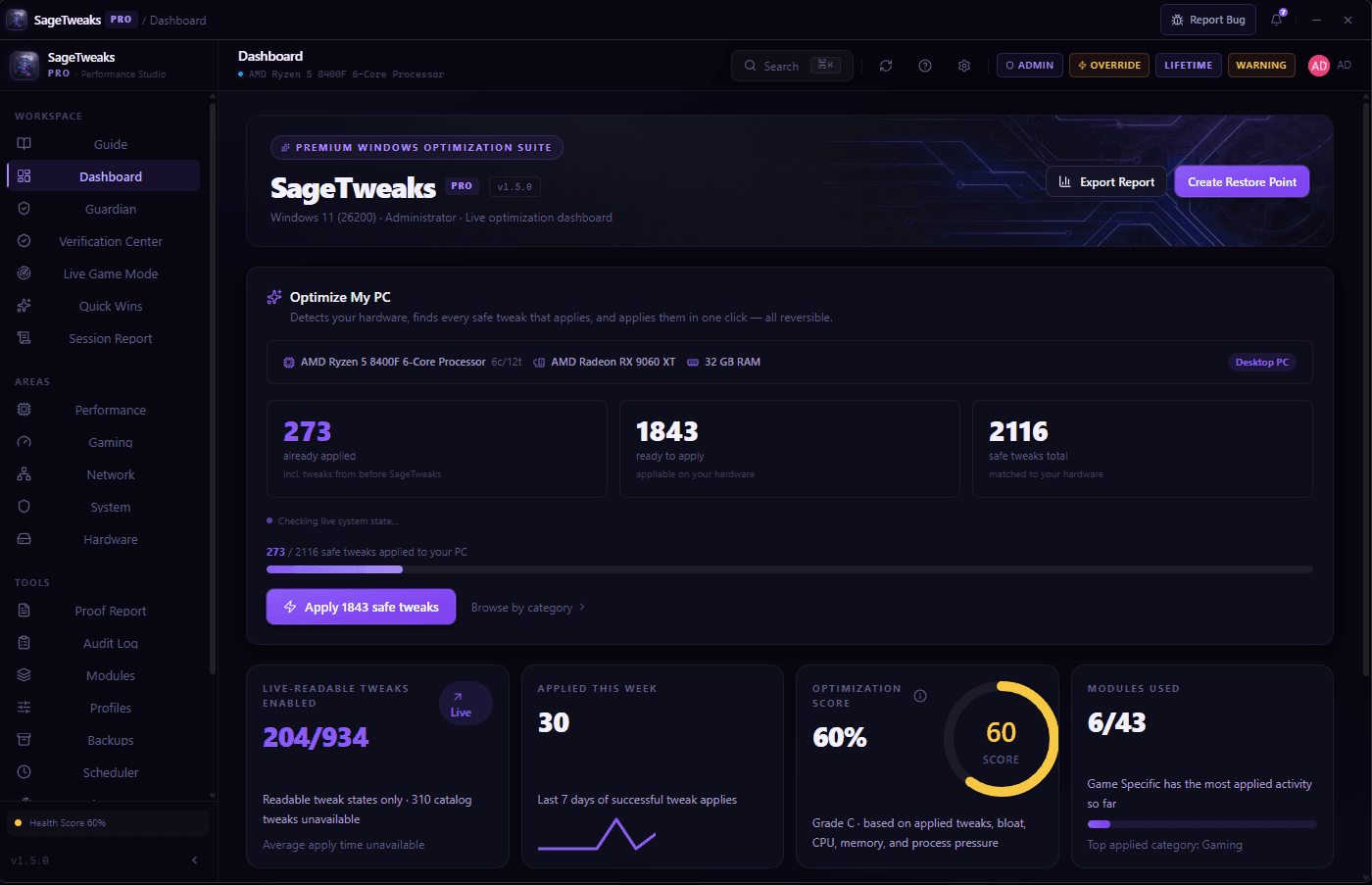
How It Works
You don't need to become a Windows expert. SageTweaks finds what to change and explains it — you approve, then play.
Install SageTweaks in seconds. It instantly scans your CPU, GPU, RAM, and installed games — no manual setup required.
No more piecing together advice from year-old forum guides. You get a shortlist built for your CPU, GPU, and the games you actually play — drawn from 1,200+ tweak entries across 43 tweak catalogs.
Apply without holding your breath — backup snapshots are taken first. Then benchmark responsiveness and frame stability on your own PC: keep what helped, undo what didn’t.
Everything above is included in the — no card needed.
Features
Everything on your PC that adds avoidable lag — background bloat, power throttling, input delay, audio latency — handled from one place, every change reversible. Spend the evening playing, not troubleshooting.
Fix the slow parts of Windows 10/11 without hand-editing the registry: 1,200+ tweak entries across 43 tweak catalogs covering performance, gaming, network, privacy, and cleanup.
Dedicated catalogs for Valorant, CS2, Fortnite, Apex, Warzone, and League, plus detected-game profiles and global gaming tweaks.
Leave less running behind your game: reduce Windows telemetry, background services, and selected pre-installed app clutter with documented, reversible cleanup flows.
Get tweaks matched to your rig, not a one-size-fits-all preset. Hardware-aware recommendations and rule-based profile analysis, computed locally on your machine.
Keep your CPU responsive instead of power-saving mid-game — gaming-focused power plan settings, visible and reversible where supported.
For when your mouse feels a frame behind: input, USB, process-priority, and latency controls designed to reduce input delay and improve frame pacing.
Your RAM may still be running at stock speeds — get personalized guidance for XMP/EXPO, C-States, Resizable BAR, and PCIe settings that you apply in your own BIOS.
Reduce avoidable audio delay so cues land when they should — tune Windows buffering, ducking, spatial sound, and legacy audio settings.
Built for Trust
We don't fake scan results or promise a magic percentage. SageTweaks makes real, reversible Windows changes — and shows you each one before it runs.
No invented "+300% faster" claims — the built-in Prove It wizard and Session Reports benchmark your average FPS, 1% lows, and frame times before and after, on your own PC.
Every change is captured with a per-tweak backup and audit log first, layered on Windows System Restore integration. Undo one tweak, or use the bulk Undo Center to step everything back at once.
Each tweak shows what it does and its risk level before you apply it. Administrator access goes only to the documented Windows operations that need it — nothing runs silently, nothing is hidden.
Built for current Windows 10/11 — if a Windows update quietly reverts a tweak, drift detection flags it, with optional automatic re-apply.
Experiment without fear — snapshots, audit logs, and rollback put things back the way they were.
Nothing injects into or touches your game client — profiles work at the Windows level only.
Local hardware detection and analysis; network requests are limited to licensing and update checks, plus optional diagnostics that are off unless you turn them on.
Want the full details? Security & verification · Refund policy · FAQ
Optimization Profiles
10 built-in profiles, no settings rabbit hole — pick your scenario, apply its app-backed tweak set in one click, and switch back just as easily.
Low-latency gaming focus
For ranked sessions where responsiveness decides fights — input, timer, CPU priority, and latency-focused settings in one profile.
Balanced graphics & performance
High fidelity without sacrificing frame pacing. Tuned for open-world and story-driven AAA titles.
Lower-latency input focus
Targets interrupt handling, USB polling, DPC latency, and mouse queue behavior for more consistent response.
Full catalog, hardware-filtered — capped at 250 tweaks
The most aggressive built-in profile. The exact tweak set depends on your detected hardware, and the app caps it for safety.
Game Profile Support
Your main game gets a dedicated tweak catalog — and the rest of your library is covered by detected-game profiles and global gaming tweaks.
Public Scanner Report
You shouldn't have to take our word for it. The current installer is code-signed with a public VirusTotal report — check the file hash and engine results yourself before running it.
SageTweaks is built with Tauri and compiled in Rust. The published installer carries a code-signing certificate, so Windows can confirm who published the file and that it has not been altered since it was signed.
Signing is not a reputation score. Windows SmartScreen builds reputation from download volume, so a first-run warning can still appear on a fresh release — choose More info → Run anyway. Comparing the SHA-256 above against your own download is the check that does not depend on anyone's reputation.
Verify yourself on VirusTotal →Verified Customers
Every review below is from a paying customer — no imports, no purchased reviews.
“I've been using this optimizer for a while now, and I can honestly say it's one of the best purchases I've made. The performance improvements are noticeable, and everything is well put together. What impressed me the most, though, is the support. No matter what time I message, I usually get a reply within minutes. Every issue or question I've had was resolved quickly and professionally. It's rare to find someone who provides this level of customer support while also delivering such a solid product. You can really tell that a lot of effort and passion went into it. I highly recommend it to anyone looking to optimize their system. Definitely worth it!”Read all reviews →
“I initially bought this app as a substitute for Hypertune, and honestly, it was a little tricky to get everything working properly at first. I was also getting in my own way when it came to performance and settings. What really impressed me, though, was the owner himself. He personally reached out to me, took the time to understand the issues I was having, and helped fix everything for me. The level of support was genuinely above what I expected. After everything was sorted, the difference in performance was huge. I went from around 60 FPS, sometimes even lower, to reaching up to 209 FPS at maximum. That is a massive improvement for me. Overall, I'm very happy with the results. The app itself is great, but the personal support from the owner is what really stood out. Definitely worth it in my experience.”Read all reviews →
Only paying customers can review SageTweaks — no imported ratings, no purchased reviews. The count here grows only as real customers post.
Bought it? Write a review →Join the SageTweaks Discord — news, giveaways, and real answers from the people who build it.
Join the Discord →Results depend on your hardware and starting configuration. Individual experiences vary.
The People Behind It
PC optimization has a trust problem. The category is full of fake scan results, invented percentage promises, and tools that change your system without telling you what they did. SageTweaks was built to be the opposite: an optimizer that shows its work.
That one decision shapes everything else. Every tweak shows what it does before it runs and can be undone after. The installer's hash and VirusTotal report are public. Reviews come only from paying customers. And where we haven't measured something, the site says so instead of rounding up.
SageTweaks is made by a small, independent, Europe-based team. There's no sales department — the people answering the Discord and the support inbox are the people building the app — you get a real reply, not a ticket number.
Numbers come from real machines and the app’s own benchmarks — average FPS, 1% lows, frame times — or they don’t get published.
Backups before every change, a bulk Undo Center, and Windows System Restore integration. Changing your mind is a supported feature.
No in-game FPS overlay, no GPU overclocking — the comparison pages list the things SageTweaks deliberately leaves to other tools.
Public SHA-256, public VirusTotal report, reviews only from paying customers, and a 30-day refund if we’re still not the right fit.
The full tweak-level breakdown of what SageTweaks touches lives on the transparency page.
Seven days of full access, benchmarks included — judge it on your own PC before spending anything.
No card. Drop your email and the key lands in your inbox straight away — your 7 days start when you set up your free account with it.
vs The Competition
Before you pay for any optimizer, see what each one actually covers — and whether it lets you undo what it changes.
SageTweaks
Gaming OS Optimizer
Hone.gg
Gaming FPS Booster
Hypertune
Gaming Optimizer
Razer Cortex
Free Game Booster
CCleaner Pro
PC Cleaner
Scores count the yes/no features compared below — a list drawn from SageTweaks' own scope. A lower score can mean a narrower (or free) tool rather than a worse one.
| Feature | SageTweaksGaming OS Optimizer | Hone.ggGaming FPS Booster | HypertuneGaming Optimizer | Razer CortexFree Game Booster | CCleaner ProPC Cleaner |
|---|---|---|---|---|---|
| 🎮 Gaming | |||||
| Dedicated + Detected Game Profiles | |||||
| Gaming tweak workflows | |||||
| Input, USB & Latency Controls | |||||
| Network / Ping Optimization | |||||
| OS-level tweak scope; review game rules | |||||
| ⚙️ System Optimization | |||||
| Windows OS tweak catalog | 1,200+ entries | Hundreds (vendor claim) | Size not published | ||
| Hardware-Aware Recommendations | |||||
| BIOS Tuning Guidance | |||||
| Telemetry Blocking (40 hosts) | ? | ||||
| Audio Optimizer | ? | ||||
| Power Plan Optimizer | ? | ||||
| 🛡️ Trust & Support | |||||
| Backup Snapshots & Audit Logs | |||||
| Optimization profile library | 10 profiles | 2 modes + game presets | |||
| 30-Day Money-Back Guarantee | |||||
| Free trial | Free tier | Free product | |||
| Starting Price | $5.99/mo | Check vendor pricing | $9.99/mo | Free product | Check vendor pricing |
This summary is for comparison research. Third-party features and prices change, so verify current vendor documentation before buying or switching.
Rather judge it on your own PC? Leave your email and the key arrives straight away. Prefer email? Write to support@sagetweaks.com.
They are a different kind of thing. AtlasOS and Tiny11 are modified Windows images — you rebuild your machine around them, and going back means reinstalling Windows. SageTweaks runs on the PC you have already set up, shows you each change before it applies, and undoes any of them in one click. You are paying to keep your existing install, and to be able to change your mind.
Includes EXM Tweaks, ParagonTweaks, UltimateTweaks, IObit & more
Zero Surprises
Know exactly what happens next — the full sequence from checkout to your first optimization session.
Payment confirmation appears immediately. Stripe processes your card — we never see your card number, ever.
Your receipt, license key, and download link are sent to your email after payment. Check spam if you do not see them.
SageTweaks_setup.exe — one file, 11.76 MB. No bundled software, no toolbar offers, no surprise installs.
The installer is code-signed, but SmartScreen reputation builds with download volume, so a blue warning can still appear on a fresh release. Click "More info" → "Run anyway" — expected and normal, and you can verify your download against the published SHA-256 first if you like.
Why does this happen? →Paste the key from your email. Activates instantly — no account login required to start.
SageTweaks records the session with backup snapshots, audit logs, and rollback support for supported tweaks. Apply individual tweaks or a full profile in a guided flow.
Restart when prompted, open your game, run a match, and compare your own frametimes or responsiveness before and after.
Changed your mind? Email support@sagetweaks.com within 30 days and we'll refund you.
Read refund policy →Still thinking about it?
Try it on your own PC, judge it by your own numbers. Every plan comes with a 30-day money-back guarantee — if it's not the right fit, email support with your order number and we'll refund you.
Get Started Today
From $5.99/mo
Your trial key arrives by email straight away. Questions go to support@sagetweaks.com.
30-day money-back guarantee · License emailed after payment · Stripe-secured checkout


